Polls and forums
Polls
The "Polls" page of the space has short votes: one question, one anonymous vote. Polls are grouped into "Open now" (those waiting for your vote come first), "Upcoming" and "Completed".
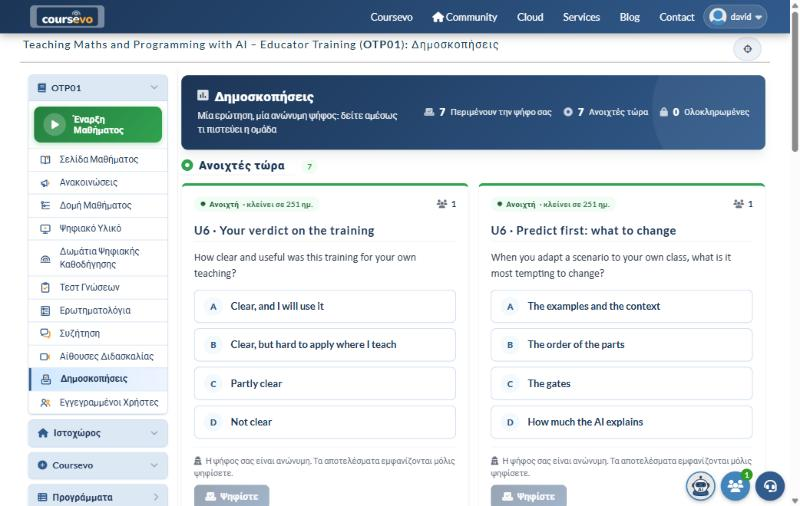
Voting
- Click one of the options (A, B, C…).
- Click "Vote".
Your vote is anonymous and cannot be changed. The results appear as soon as you vote, or when the poll closes. If you click the title of an open poll, the results update "Live" as others vote.
Voting without an account
In a presentation or a classroom, the instructor may show a QR code. Scan it with your phone and vote without signing in. You vote once from each device.
Forums
The "Forums" service is the forum of the space. It has categories, each category has topics, and each topic has posts. A badge shows the unread ones.
New topic
- Open a category and click "New Topic".
- Write the "Discussion Topic" (up to 128 characters) and the "Message".
- Click "Submit".
Replying
- Open the topic. The page goes to the first unread post.
- Click "Reply" (at the top or the bottom).
- Write your message. You can add images and links to the course content.
- Click "Submit".
With "Quote" you reply by quoting a post. You correct your own posts with "Change" or remove them with "Delete". Clicking a member's name shows their profile, and with "Personal Message" you write to them privately.
Notifications for a topic
Turn on "Send me notifications about new posts in this topic" to get an e-mail when someone replies to the topic.
The Coursevo Mentor
In categories where the instructor has turned it on, the Coursevo Mentor, an AI system, answers questions based on the content of the space. It answers when a post looks like a question or a request for help, and always when you mention it with "@mentor" or "@μέντορ". It answers in the language of the post.
Its replies are labeled as coming from an AI system and may contain mistakes.