Certificates and Open Badges
When you complete a program, you can receive a certificate (a PDF file) and an Open Badge (a digital badge recognized internationally). You find them under Site › Certificates.
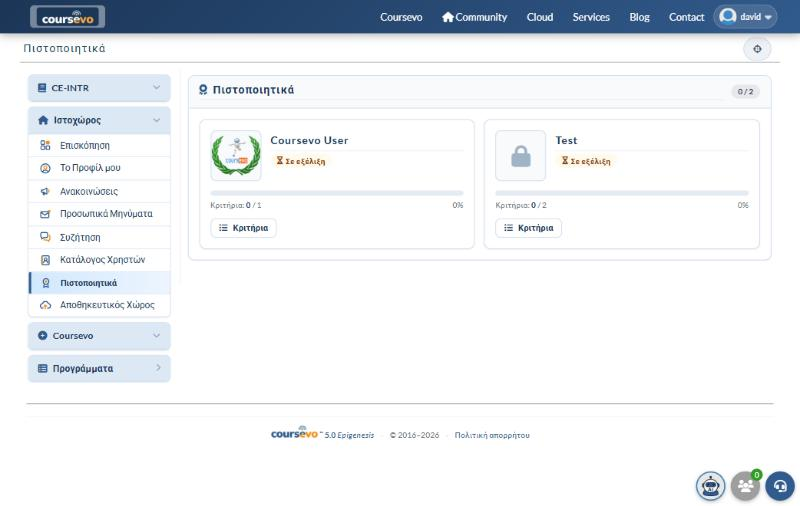
The "Certificates" page
You see the programs that concern your spaces. For each program:
- the status: "In progress", "Completed", "Revoked" or "Ended";
- the training hours;
- the progress: the "Criteria" you have met out of those required; in a program awarded with part of its spaces, the "Spaces" you have completed out of those required;
- once you receive it, the "Verification code" and the date of issue.
With "Criteria" you see what is needed: grades in specific spaces, or "Learning path completed". Next to each criterion you see whether you have met it.
Getting a certificate
When you meet all the criteria, click "Certificate". The certificate is issued and opens as a PDF. In many programs it is also issued automatically, with a notification, as soon as you complete the learning path or get graded.
Open Badge
- "Open Badge": shows your badge, who issues it and what it certifies. With "Download" you download the badge file to upload it to other services.
- "LinkedIn": adds the certification to your LinkedIn profile, with the name, the issuer, the date and the verification link filled in.
Verification
Anyone, e.g. an employer, can check that a certificate is genuine:
- Click "Verify" on the card, or scan the QR code of the certificate. The "Certificate verification" page opens.
- If it opens without a code, type the "Verification code" as it is printed, with the dashes.
The page says whether the certificate is "Valid", whether it has been "revoked" or has "expired", and shows the holder, program, issuer, date and hours. With "Copy link" you send the result to someone.
The code also opens the document
Anyone who has the verification code can see the PDF of the certificate. Give the code only to those you want to see it.