The home page
After you sign in, you see the "Home Page". You can return to it from the menu Site › Overview.
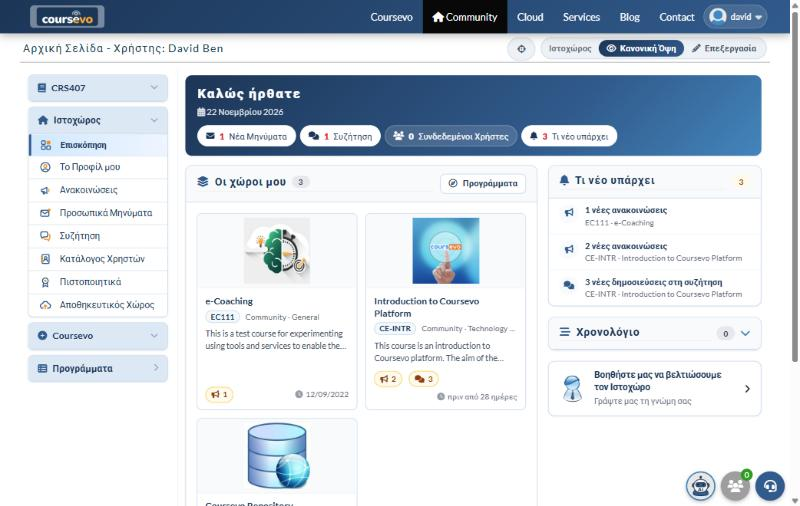
Top: welcome and counters
Next to "Welcome" and today's date there are counters. Any counter with something new is highlighted. Click it to open the matching page:
- "New Messages": your personal messages.
- "Forums": new replies in the site's general forum topics.
- "Online Users": who is on the platform right now.
- "What's new": takes you to the column with the news from your spaces.
My spaces
The "My spaces" card shows all the activity spaces you take part in, grouped by program and category.
To enter a space, click anywhere on its row or card.
For each space you see:
- its image, name and code;
- markers for anything new: "Deadline", "new announcements", "new forum posts", "new posts in your groups"; each marker opens that part of the space directly;
- your "Progress" as a percentage;
- its status: "Completed", "Upcoming" or "Pending Registration Approval";
- when you last visited it ("Today", "Yesterday", "3 days ago"…).
If you do not take part in any space yet, click "Browse activity spaces" or "Programs" to find one.
When you have many spaces
With more than 6 spaces, extra tools appear:
- Search: "Search my spaces" by name, code, program or category. The / key moves to the field and Enter opens the first result.
- "View": only "Current" or "Completed" spaces, only those marked "I manage" or "I take part", by type, or only those with news ("With news").
- "Sort": "By program", "Recent" or "A to Z".
- "List" or "Cards", and "Expand all" / "Collapse all" for the groups.
- Pinning: the "Pin to quick access" button puts a space on the "Quick access" card at the top of the page, together with the most recent ones.
Your browser remembers the sorting, the view and which groups were open. Search and filters always start empty.
What's new
The "What's new" column gathers from all your spaces:
- deadlines, the soonest first;
- unread announcements;
- new posts in forums and groups.
When there is nothing, it says "Nothing new".
Further down, the "Timeline" shows posts in chronological order.
Your feedback
The "Help us improve this site" card opens a new support ticket of type "Suggestion".