Programs and spaces
The "Programs & Spaces" page organizes everything the site offers:
- Program: for example, a study or training program, with periods (for example, semesters).
- Space series: a course of the program.
- Space: one run of the series in one period, with its own members.
Series or space?
The same course again, with new members or in a new period, is a new space in the same series. Something different is a new series.
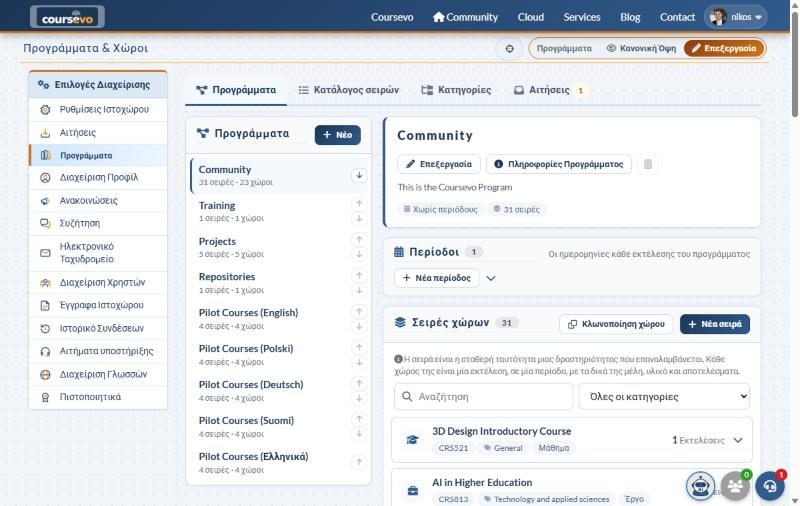
Programs
With "New program":
- "Title" and "Description";
- "Period length": "No periods" (spaces stay open, with no end date) or in months;
- "Period names" (for example, Fall, Spring) and "Program length (number of periods)".
With "Program information" you write the description that applicants see (Program description). You cannot delete a program that has series.
Periods
In "Periods", with "New period", you set "Period", "Start" and "End" (empty end: open period). You need a period to create spaces. You cannot delete a period that has spaces.
Series and spaces
- In "Space series", click "New series": "Program", "Code" (empty: automatic), "Position in the program", "Title", "Type", "Category" (required) and "Description".
- Open the series, choose a free period and click "New space".
For each space: "Login", "Manage space", "Clone a space" and "Delete".
Deleting a space
The space is deleted together with all its material, members and results. This cannot be undone.
Cloning
"Clone a space" copies a space, with material, structure and activities but without members and results, into any program, period and language you want. The new space stays hidden until you check it. Details and translation: Copying and translating a space.
Categories
On the "Categories" tab you build the category tree ("New category", "New subcategory"). Each series belongs to a category; you cannot delete a category that is in use.
The "Series catalogue" tab shows all series, with search, filters and sorting.
Requests for new spaces
Site members can request a new series or a new space in an existing series. On the "Requests" tab, "Create" makes the series (if needed) and the space in the requested period, and adds the requester to the space.