Site documents
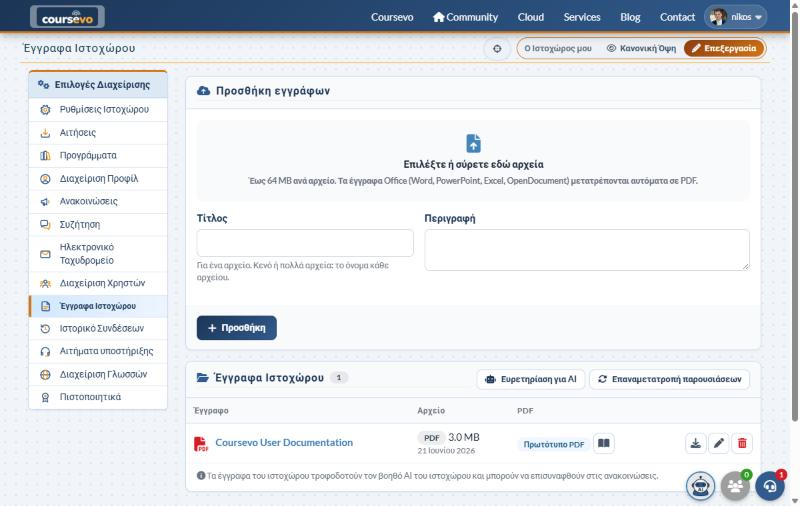
"Site Documents" are the organization's documents: guides, regulations, forms. They have two uses:
- you attach them to site announcements ("Insert link to document");
- they feed the Coursevo Bot, the site's AI assistant, which answers based on them.
Adding documents
- In "Add documents", select or drag files. You can add many at once.
- "Title": for one file only. With several files (or an empty title), each document's title is its file name.
- "Description" (optional; with several files, it applies to all of them).
- Click "Add".
Up to 64 MB per file. Office documents (Word, PowerPoint, Excel, OpenDocument) are converted to PDF automatically.
Give your files good names
The document title is also the source name the Coursevo Bot sees. A file named "Study Regulations 2026.pdf" is more useful than one named "doc_final2.pdf".
The list
For each document: title and description, type, size and date, and the PDF column:
| Indicator | Meaning |
|---|---|
| "Original PDF" | The file is already a PDF |
| "Converting" | The conversion is running now |
| PDF and size | Ready: "View", "Download PDF", "Convert again" |
| "Convert to PDF" | Not converted yet; "Conversion failed" if the last attempt failed |
| — | This type is not converted |
"Convert all to PDF" converts the ones that are missing. Actions per document: "Download original", "Edit" (title, description) and "Delete".
The Coursevo Bot
Every new document is registered for the AI automatically. "Index for AI" rereads all documents, for example after a bulk change. When you delete a document, it is also removed from the AI.
Which types the bot reads
The Coursevo Bot uses PDF, Word (.docx), text (.txt) and HTML documents. It does not use presentations (.pptx), spreadsheets or OpenDocument files, even if they have been converted to PDF. For the bot, upload such content as PDF.
The bot also answers from the documents of the platform's community sites and, when the user is inside a space with AI turned on, from the space's digital material. Its rules (only from the documents, nothing made up, in the user's language) are fixed.
This documentation reaches the bot the same way: as site documents.