Site settings
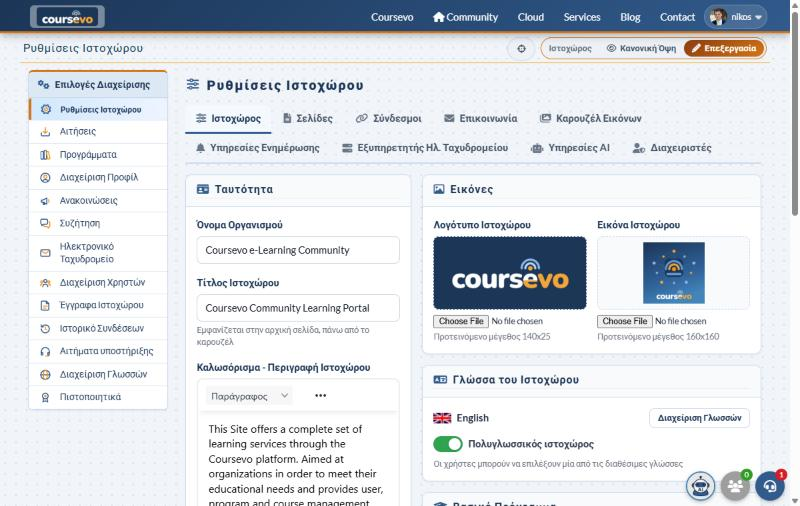
"Site Settings" has tabs. On each tab, click "Update" to save your changes.
Site
- "Identity": "Organization Name" (required), "Site Title" (above the carousel on the home page), "Welcome - Site Description", and the title and description of the left column that visitors see before they sign in.
- "Images": "Site Logo" (about 140×25) and "Site Image" (about 160×160). JPG, PNG, GIF or WEBP, up to 8 MB.
- "Site Language": the default language and the "Multilingual site" switch, which lets users choose a language. Which languages: Languages and translations.
- "Default Program": the program that opens first in the catalog.
Pages
Information pages, such as a study guide or regulations. With "New page" you enter a "Page Title" and text, and you set:
- "Published" or draft;
- "Show in:" the "About" menu in the top bar and/or the "Studies" card in Programs.
Links
Links in the left column of the home page, before sign-in: "Link name" and "Address" (https or mailto).
Contact
The site's "Contact e-mail" and "Contact information".
Image carousel
The images that rotate on the home page. Aspect ratio 16:9, up to 8 MB each. You can move them left/right or delete them.
Notification services
- "Inform course administrators for new registration requests": an e-mail to space administrators about pending registration requests, every 1–7 days, at the time you set.
- "Inform course administrators for new periods and new courses": when a new period starts, space administrators see a suggestion when they sign in to create their spaces for the new period (see New runs).
E-mail server
The server the site uses to send e-mail (registrations, notifications, mailing list): "Server address", "System User Address", "System user password" (empty: the saved one stays), "System Username" (the sender that recipients see) and "System Message Prefix".
No server, no e-mail
If it is not set up, the mailing list does not send and new users do not get their details by e-mail.
AI services
The organization's AI provider and model, and the usage limits. See AI services and usage limits.
Administrators
The "Site administrators":
- "Add administrator": you search for a user of the site.
- "E-mail for new tickets": which administrators get an e-mail about new support tickets.
- "Remove administrator": the user becomes a "Course Administrator" or a "Site User".