Site admin guide
This section is for site administrators: the people who set up an organization's site, its users, its programs and its spaces.
Setting up a new site? See Setting up a site, in order.
Managing the site
On your home page, next to the title, click "Site [Edit]". "Manage Site" opens and the left menu becomes "Management Options". To go back, click "[Normal View]" in the title of any page.
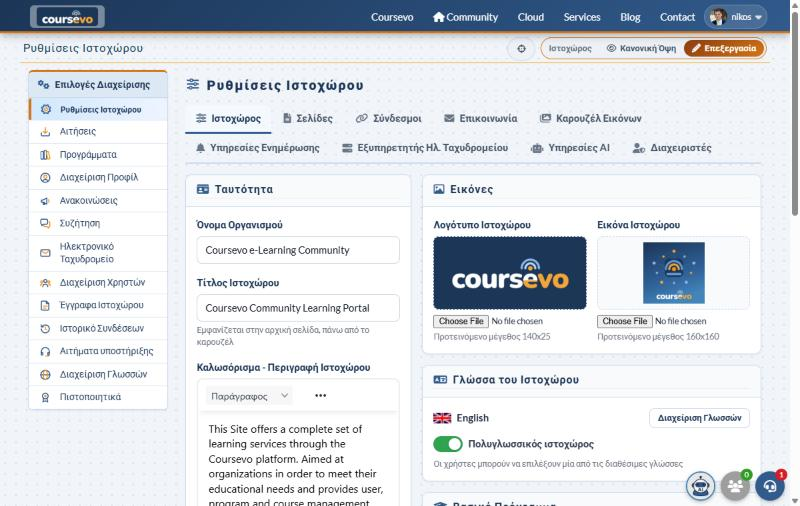
| Menu | Page |
|---|---|
| "Site Settings" | Site settings |
| "Programs" | Programs and spaces |
| "User Management" | Users |
| "Announcements", "Forums" | Site announcements and forums |
| "E-mail" | Mailing list |
| "Site Documents" | Site documents |
| "Connection Log" | Connection log |
| "Support tickets" | Support tickets |
| "Manage Languages" | Languages and translations |
| "Certificates" | Certification programs and templates; see Certificates and badges |
Roles
| Role | What it does |
|---|---|
| "Site Administrator" | All settings and all users |
| "Course Administrator" | Site announcements, mailing and documents, but not settings or users |
| "Support User" | User support |
| "Site User" | The regular user |
| "Temporary User" | Limited access, no enrollment in spaces |
Full access
A site administrator has full access to all settings and all users. Give this role only where it is needed. A role change takes effect the next time the user signs in.